Managing Your Payment Method
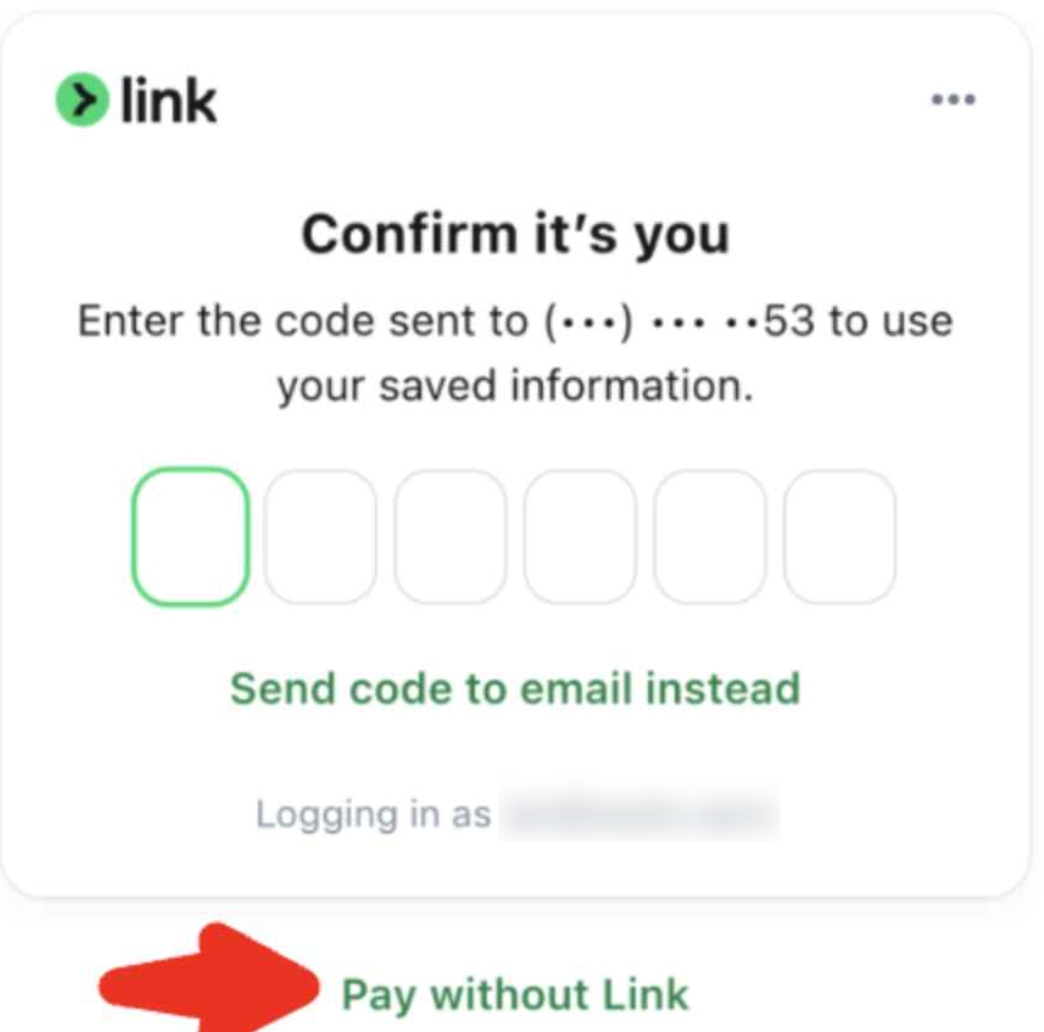
When you click Manage Billing, you may see Link, Stripe's secure checkout service.
Link is optional. If you run into verification issues, you can still update your payment method without using it.
Why is Link asking me to verify my phone number?
Link stores its own account information, including your phone number and saved payment methods.
This information is separate from your seats.aero account.
The phone number shown in your seats.aero Settings is not used by Link, so the two phone numbers may be different.
My phone number is wrong in Link
Unfortunately, we can't view or update the phone number associated with your Link account.
If Link is asking you to verify a phone number you no longer have access to, you have two options:
- Update your Link account directly.
- Skip Link by selecting Pay without Link at the bottom of the payment window.
I just want to update my credit card
The easiest option is to click Pay without Link.
This lets you enter a new card without signing in to Link.
Can seats.aero change my Link information?
No.
Because Link is a separate Stripe service, we can't:
- Change your Link phone number
- Change your Link email address
- Verify your identity with Link
- Access or edit your Link account
I'm still having trouble
If you're still unable to update your payment method after trying the steps above, contact support with:
- Your seats.aero account email
- A screenshot of what you're seeing
- A brief description of the issue
We'll be happy to help determine whether the problem is related to Link or your seats.aero account.