How to Enable Cardholder Pricing
seats.aero Pro members can enable Cardholder Pricing to see discounted award prices they may qualify for through eligible co-branded credit cards, memberships, or elite status.
When enabled, prices are only adjusted where the applicable discount applies.
How to enable Cardholder Pricing
- Sign in to your seats.aero Pro account.
- Open Settings.
- Select the Preferences tab.
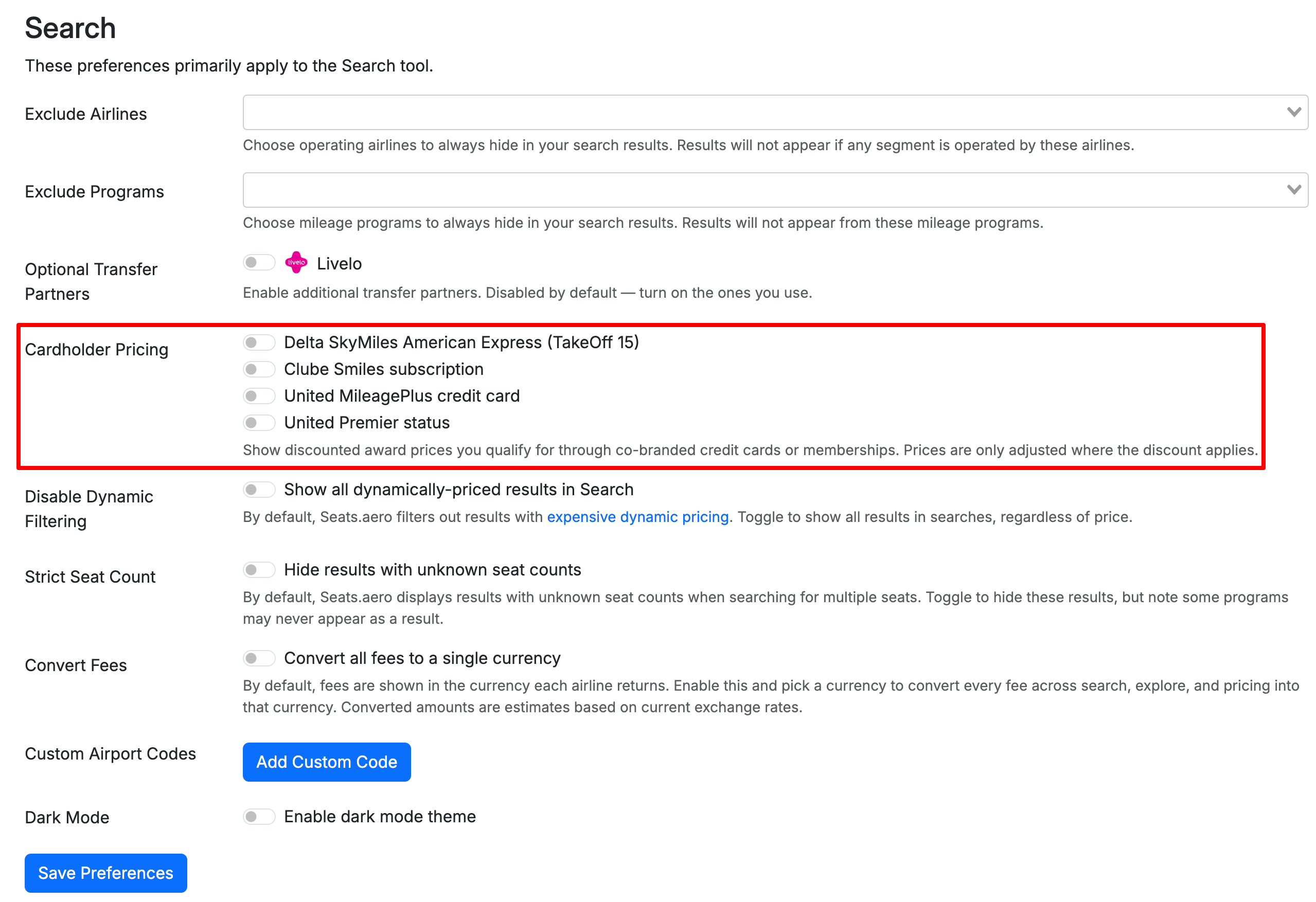
- Scroll down to Cardholder Pricing.
- Enable the benefits that apply to you.
- Select Save Preferences.
You can currently enable:
- Delta SkyMiles American Express (TakeOff 15)
- Clube Smiles subscription
- United MileagePlus credit card
- United Premier status
Only enable benefits you're eligible to use, since enabling these settings may cause seats.aero to display award prices or availability that aren't available to all members.
Delta SkyMiles American Express
Eligible Delta SkyMiles American Express cardholders can enable TakeOff 15 pricing.
When enabled, seats.aero will show discounted award pricing where the TakeOff 15 benefit applies.
Clube Smiles
If you have an eligible Clube Smiles subscription, you can enable this option to see applicable discounted award pricing in your search results.
United MileagePlus Credit Card
Eligible United MileagePlus cardholders can enable this setting to see applicable cardholder award pricing.
This may also surface expanded award inventory available to eligible United cardholders.
United Premier Status
If you have eligible United Premier status, enable this option to account for award availability and pricing associated with your Premier benefits.
This may surface additional award inventory that isn't available to general MileagePlus members.
What happens after I enable a benefit?
Once you've enabled the benefits that apply to you and saved your preferences, seats.aero will account for them when displaying applicable award search results.
You don't need to enable these settings before every search. Your selections are saved in your preferences until you change them.