Understanding Search Views
seats.aero offers four different search views, each designed for a different way of exploring award availability. Whether you're comparing loyalty programs, browsing every routing, or looking for a specific flight, choosing the right view can help you find what you're looking for faster.
You can switch between views at any time using the View Switcher above your search results. Your selected view will be remembered for future searches.
All of the current search views contain the same underlying flights and availability. They simply organize and display the results differently.
Which search view should I use?
| View | Best for |
|---|---|
| Quick Compare | Comparing award availability across programs at a glance |
| Routes Breakdown | Exploring different routings and connection options |
| Calendar | Comparing award availability and prices across dates |
| Individual Flights | Viewing individual flights with the most detail and filtering options |
Quick Compare
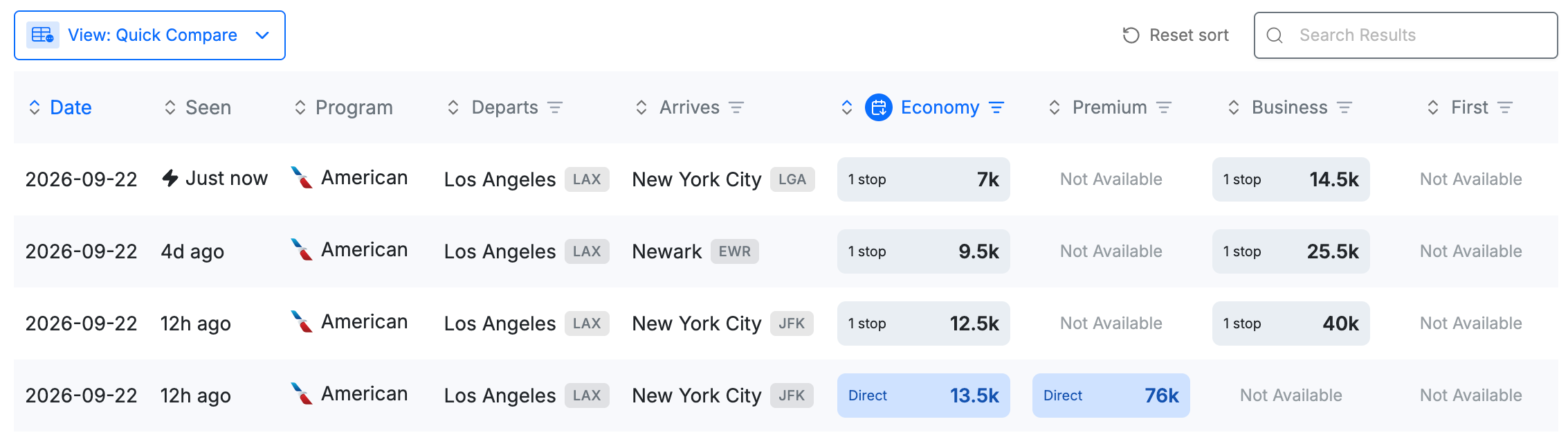
Best for: Comparing award prices across multiple loyalty programs.
Quick Compare is the default search view and the best choice for most searches. It summarizes the lowest-priced award options available through each loyalty program so you can quickly compare your choices.
Direct and connecting itineraries are displayed separately, making it easy to see whether an award price applies to a nonstop flight or an itinerary with one or more connections.
What you'll see
- One row per loyalty program
- Direct and connecting itineraries displayed separately
- Award prices for multiple loyalty programs side by side
- The lowest-priced options available for each program and cabin
Use Quick Compare if you:
- Want to compare prices across multiple loyalty programs
- Want to quickly identify the cheapest award options
- Want to distinguish between direct and connecting availability
- Are starting a search and exploring your options
Example
Searching Los Angeles (LAX) → New York (NYC) will group identical itineraries together, allowing you to compare which loyalty programs charge for the same flight without scrolling through duplicate results.
Routes Breakdown
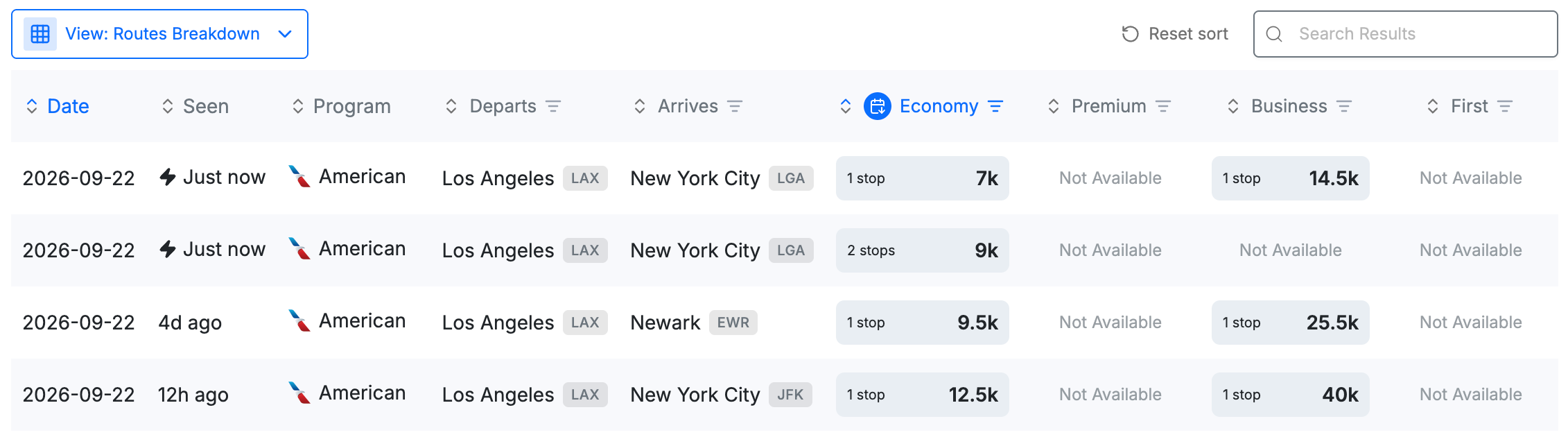
Best for: Exploring every routing available within a specific loyalty program.
Routes Breakdown organizes results by loyalty program first, then separates them by their routing or stop combination.
Instead of grouping identical itineraries across multiple programs, it lets you browse every routing available within each program.
This view is especially useful when you want to understand all of the routing possibilities available through a particular loyalty program.
What you'll see
- Results grouped by loyalty program
- Separate rows for different routing or stop combinations
- Direct and connecting itineraries broken out separately
- Award prices, taxes, airline, cabin, and transfer partner information
Use Routes Breakdown if you:
- Already know which loyalty program you want to use
- Want to compare all routing options within one program
- Prefer browsing by loyalty program instead of individual itinerary
- Want to see how different routing options affect the number of stops or award price
Example
If you're searching Los Angeles (LAX) → New York (NYC), Routes Breakdown may show separate rows for nonstop flights and different connecting routings within the same loyalty program, making it easier to compare the options available through that program.
Individual Flights
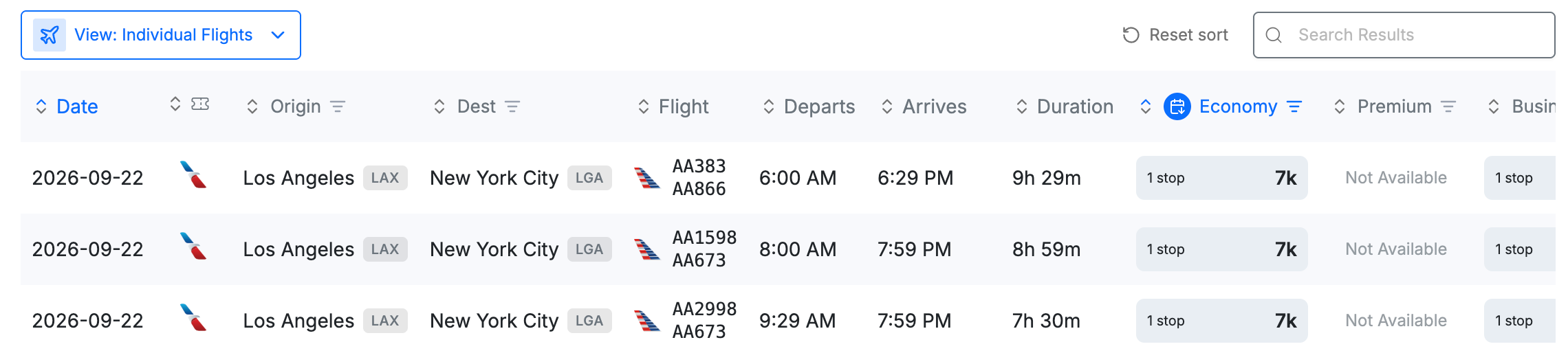
Best for: Viewing every available itinerary and using detailed search filters.
Individual Flights displays one row for every available itinerary. Results aren't grouped by program or routing, allowing you to browse every eligible flight independently.
This view also includes the most comprehensive filtering options, making it the best choice when you have specific preferences such as departure time, arrival time, connection airport, aircraft type, or duration.
Because this view searches individual itineraries instead of grouped routes, switching to Individual Flights may reload your search.
What you'll see
- One row for every available itinerary
- Detailed flight information
- Individual departure and arrival times
- The most comprehensive set of search filters
Additional filters include
- Connection airports
- Fare codes
- Aircraft type
- Duration
- Departure time
- Arrival time
Use Individual Flights if you:
- Want to see every available itinerary
- Need to filter by departure or arrival time
- Want to filter by connection airport, aircraft, fare code, or duration
- Are looking for a specific flight
- Prefer viewing every option separately rather than grouped
Example
Searching Los Angeles (LAX) → New York (NYC) will display every eligible itinerary on its own row, making it easy to compare departure times, connections, aircraft, and other flight-level details.
Calendar

Best for: Flexible travelers who want to compare award availability across dates.
Calendar displays award availability and prices by date, making it easy to compare multiple dates without searching each day individually. It’s especially useful when your travel dates are flexible and you want to quickly identify lower-priced award options.
What you’ll see:
- Award availability organized by date
- Lowest points prices for each date
- Nonstop and connecting options
- Availability based on your selected programs and filters
Use Calendar if you:
- Have flexible travel dates
- Want to compare award prices across multiple dates
- Want to quickly identify dates with lower-priced awards
- Prefer a visual overview of availability
For a full walkthrough, see How to use Calendar View.
Customize your search results
In addition to choosing a search view, you can customize how your results table is displayed.
Depending on the view, you can:
- Hide specific cabins you don't want displayed
- Sort your results using options including Cheapest by Date and Cheapest Direct
- Switch between city names and airport codes
- Set your color preferences in your account settings
seats.aero saves your table preferences so you don't need to configure them again each time you search.
Which view is right for me?
If you're unsure where to start:
- Use Quick Compare to compare award prices across multiple loyalty programs at a glance.
- Use Routes Breakdown to compare different routings and connection options.
- Use Calendar when your dates are flexible and you want to compare availability and prices across dates.
- Use Individual Flights when you want to see specific flights and use the most detailed filtering options.
Quick Compare is a great default starting point, and you can switch views at any time depending on what you want to compare.